Access information about event types across the organization when you use an owner or admin generated personal access token. For example, sales leaders can give prospects access to the scheduling page links of specific account executives and customer success leaders can give clients access to their specific account managers.Documentation Index
Fetch the complete documentation index at: https://calendly-preview.mintlify.app/llms.txt
Use this file to discover all available pages before exploring further.
To get scheduling page links to event types across the organization
Use the procedure below to access the event types across and organization using either required query parameterorganization or user URI.
- Generate the personal access token using either an Owner or Admin’s Calendly account..
- Get and copy the organization or user URI (see how to find the organization and user URI.)
- Replace
{access_token}with your owner or admin generated personal access token. - To get all links to event types across the organization, make GET request to the
/event_typesendpoint using theorganizationscope.
/event_types endpoint using the user scope.
Example request:
curl —request GET \
—url ‘https://api.calendly.com/event_types?user=\{user _uri}’ \
—header ‘authorization: Bearer {access_token}‘
Review the response payload
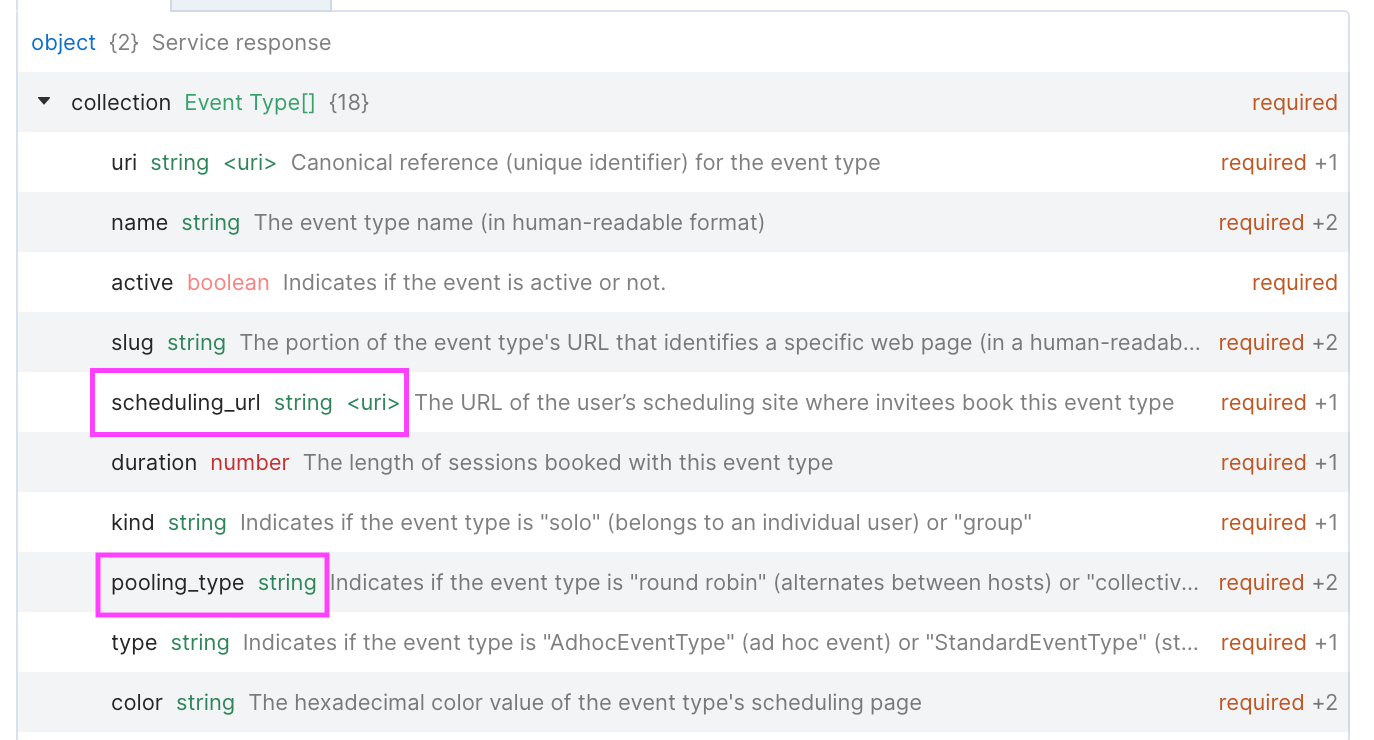
Along with other information about the event, the response payload will include:- the
scheduling_urivalue that you can distribute out or add to your product so invitees can schedule a time with a team member - the
pooling_typevalue which will indicate the event type such as around robinorcollectiveso you can understand what kind of event type you’re sharing. If it’s not an event type with pooling capability, then the value will show asnull.